
Students
The Student List page on eSchool Siakad Plus SMKN 8 Malang presents all student data in one interactive and easy-to-use table view. This feature allows student affairs staff, homeroom teachers, and teachers to perform student data searches, verification, and processing more efficiently.
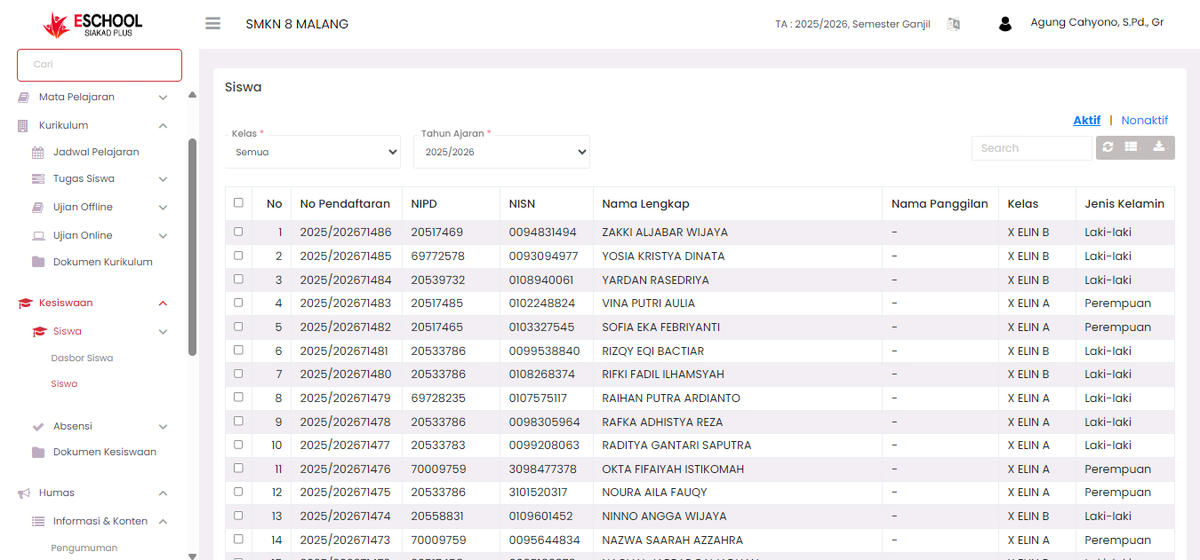
🧾 Student List Page Featured Features
🔎 Filter By Class and Academic Year
- Users can select a specific class and active academic year to filter the data view.
- Provides fast access to student data from relevant periods and study groups.
📊 Comprehensive Data Display
The student list table presents important information such as:
- Registration No – Unique student registration code.
- Student ID (NIPD) – School Student Identification Number.
- National Student ID (NISN) – National Student Identification Number.
- Full Name and Nickname
- Class
- Gender
All data is displayed in a responsive table format, facilitating quick scanning as well as manual checks.
🧠 Student Status: Active vs Inactive
- At the top of the page there is a status filter:
- Active: Only displays students who are still registered as active.
- Inactive: Displays students who are already inactive (for example due to moving or graduating).
- Suitable for audit purposes, annual recapitulation, or student status verification.
🔧 Additional Features
- Search Bar: Facilitates quick search based on name, NISN, or others.
- Action Buttons:
- 📋 Print: To print student data.
- ⬇️ Export: Download data in Excel/CSV format for reporting purposes or other system integration.
- 👁️ Detail View (optional depending on access rights): View student information in more detail.
If you require further assistance, contact us through the eSchool Help page.