
Finance Dashboard
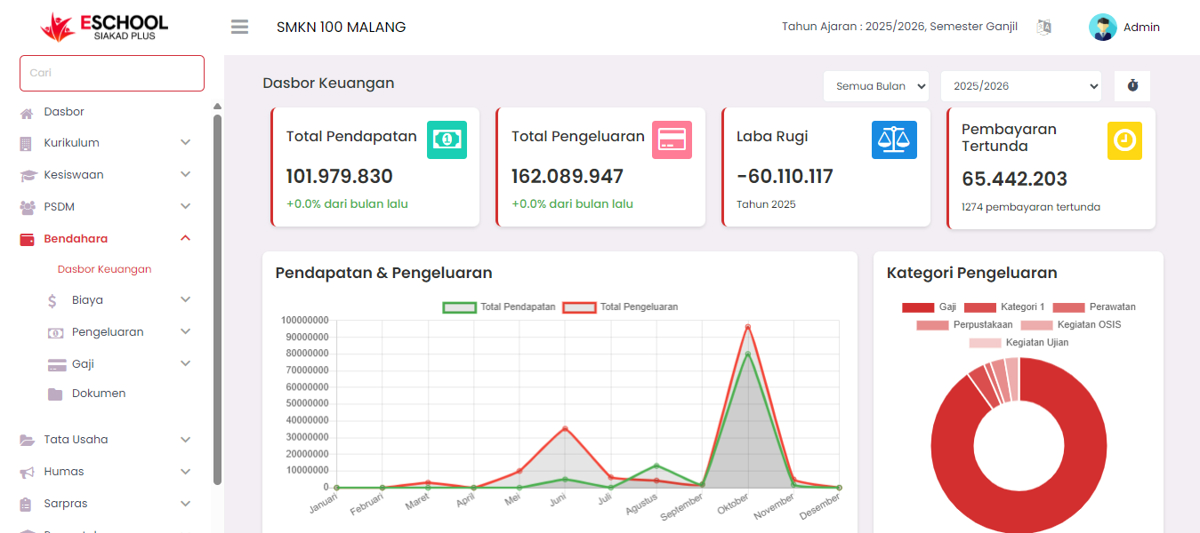
The Finance Dashboard page displays a summary of the school's overall financial condition in a single view. The goal is to help users understand the flow of income, expenses, and current financial status without having to open reports one by one.
1. Financial Summary
At the top of the page, there are four main boxes displaying summary data:
- Total Income: Shows the total amount of all school receipts in the selected period.
- Total Expenses: Shows the total amount of all school expenses in that period.
- Profit/Loss: Displays the difference between total income and total expenses. A negative value means a loss occurred.
- Pending Payments: Shows the total nominal amount of payments not yet completed by related parties, along with the number of pending transactions.
This section can also be filtered by month and academic year to facilitate specific data analysis.
2. Income & Expense Graph
A line graph displays the comparison between total income and total expenses per month in one academic year. This graph makes it easy for users to see school financial trends, such as months with the highest expenses or lowest income.
3. Expense Categories
This section displays a pie chart that divides expenses based on categories such as:
- Salaries
- QHS Activities
- Maintenance
- Exam Activities
- Library
The goal is so that users can know the proportional allocation of school funds.
4. Teacher Salary
There are two main components:
- Payment Status Graph: Shows the number of teachers with "Paid" and "Pending" payment status.
- Teacher Salary Table: Displays the total number of teachers and salary nominals based on payment status.
This section helps the finance department monitor teacher salary payments that are still pending.
5. Student Fee Discount
Displays a list of students who received fee cuts along with details:
- Student name
- Class
- Final amount after discount
Also accompanied by a summary:
- Total Student Discounts: Number of students receiving discounts.
- Total Discount Amount: Total nominal value of discounts given.
- Average Discount: Average discount value per student.
- Total Final Amount: Total amount of fees after discounts are applied.
6. Student Billing
This table contains a list of fee types charged to students, including:
- Fee type (such as cleanliness, textbook, contribution, and enrollment fee)
- Payment due date
- Number of students charged the fee
- Total billing nominal
The search feature in the top right of the table helps find specific billing data quickly.
If you require further assistance, contact us through the eSchool Help page.