
Leave Report
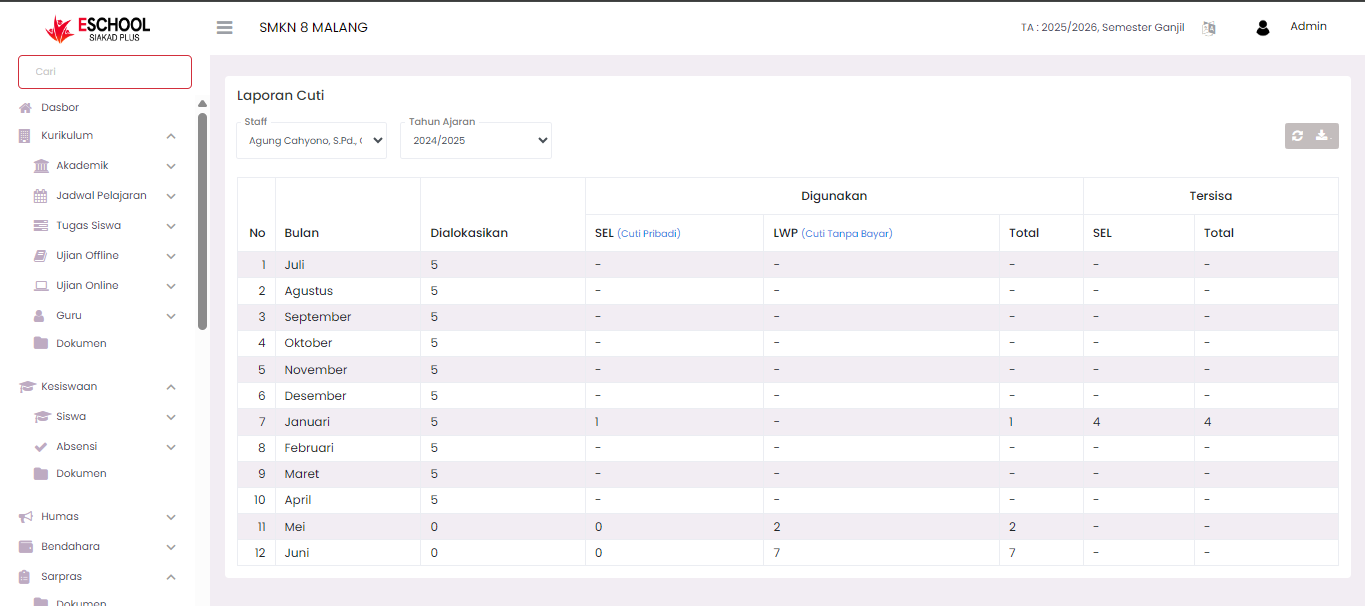
The Leave Report page is used to display staff leave recapitulation based on a certain period of time (Academic Year and Month). This report helps the admin or superior to monitor the use of leave for each staff throughout the selected academic year.
Purpose
Providing a clear overview of:
- Number of allocated leaves.
- Types of leave used.
- Remaining leave still available.
Leave Report View
1. Data Filter
At the top of the page, there are two main filters:
- Staff → select the staff whose report you want to see.
- Academic Year → select the academic year to display leave data for that period.
2. Report Table
The leave report table is divided into several columns:
| Column | Note |
|---|---|
| No | Month sequence number. |
| Month | Name of the month in the selected academic year. |
| Allocated | Number of leaves granted in that month. |
| Used - SEL (Personal Leave) | Number of personal leaves that have been taken. |
| Used - LWP (Leave Without Pay) | Number of leaves without pay that have been taken. |
| Used - Total | Total of all types of leave that have been used in that month. |
| Remaining - SEL | Remaining personal leave that can still be used. |
| Remaining - Total | Total remaining of all types of leave still available. |
3. Action Buttons
- Refresh → Updates leave report data.
- Download → Exports the leave report in a file format that can be saved.
Usage Tips
- Use the Staff filter to display reports per individual.
- Check the LWP column to monitor leave without pay taken by staff.
- Use the Download feature to create archives or formal reports.
- This report is read-only and cannot be edited directly from this page.
If you require further assistance, contact us through the eSchool Help page.