
Import Staff Data
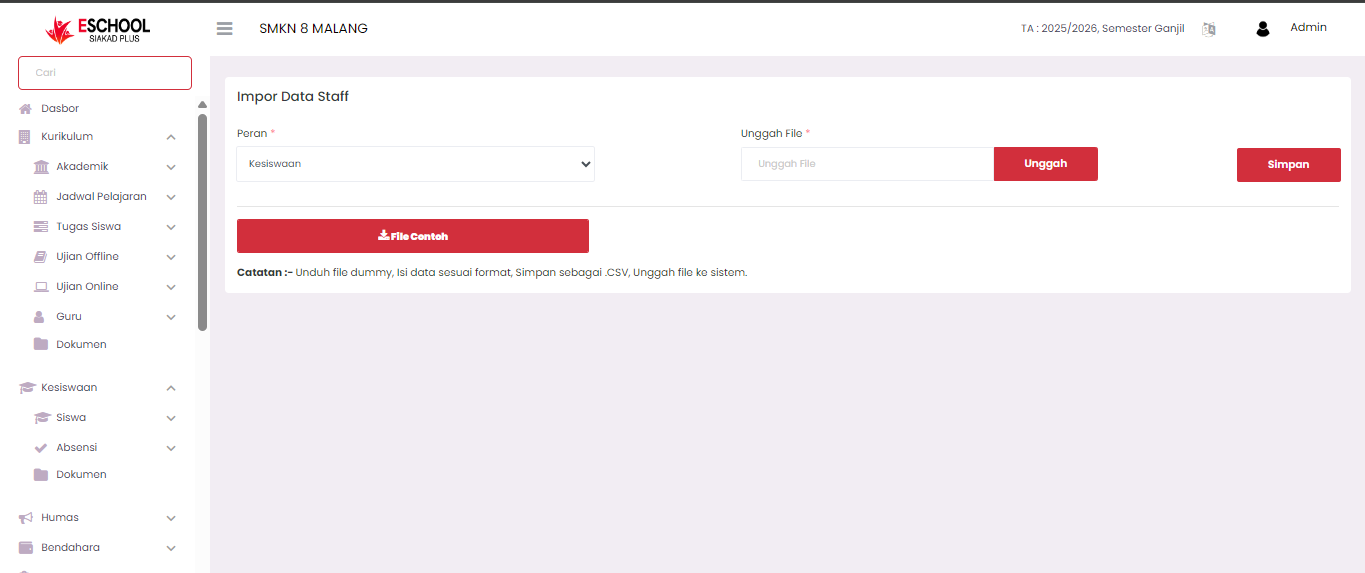
The Import Staff Data page is used to add employee or staff data in bulk to the E-SCHOOL SIAKAD Plus system through uploading a file in .CSV format. This feature simplifies the process for administrators to input a lot of staff data at once, without having to add them one by one manually.
Purpose
This feature aims to:
- Speed up the staff data input process.
- Minimize manual input errors.
- Provide a standard format for data consistency.
Data Import Steps
- Select Role
Select the appropriate staff role in the Role column. This role will apply to all imported staff data. - Download Sample File
Click the Sample File button to download the CSV file containing the standard format that must be followed.
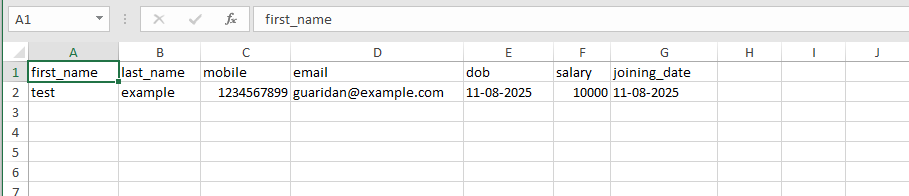
The column structure in the sample file is:
first_name→ First namelast_name→ Last namemobile→ Phone numberemail→ Email addressdob→ Date of birth (format: DD-MM-YYYY)salary→ Base salaryjoining_date→ Joining date (format: DD-MM-YYYY)
&#xNAN;(Example structure can be seen in that image)
- Fill in Data
Complete the CSV file with staff data according to the format. Ensure that no columns are deleted or renamed. - Upload File
- Click the Upload button, select the filled CSV file.
- Ensure the file type is .CSV.
- Save Data
Once the file is uploaded, click Save to process and add the data to the system.
Important Notes
- The date format must follow DD-MM-YYYY so that the data is correctly read by the system.
- Ensure the email address is valid to avoid failure in sending information to the staff.
- Re-check the data before uploading to minimize errors.
- The system only accepts files with the .CSV extension.
If you require further assistance, contact us through the eSchool Help page.