
Activity Attendance Report
The Activity Attendance Report page in eSchool is designed to record and monitor student attendance in non-lesson activities. This feature separates special activity attendance from routine daily and per-subject attendance, so that reporting becomes more specific and orderly.
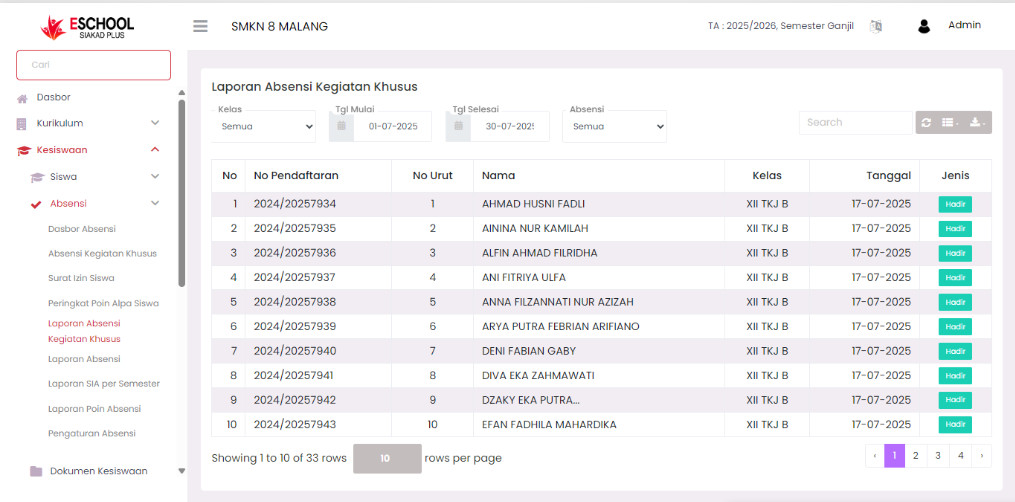
Navigation and Filters
Data Filter
Users can filter reports based on:
- Class: Displays special activity reports per class.
- Start Date & End Date: Specifies the time range of activity recording.
- Attendance Type: Filters data based on attendance status (Present, Sick, Permission, Alpha).
This filter facilitates presency data search for certain periods and groups.
📊 Attendance Data Table
Each row in the table contains the following information:
| Column | Description |
|---|---|
| No | Data sequence number |
| Registration No | Student registration number |
| Sequence No | Sequence number within class |
| Name | Student's full name |
| Class | Student's home class |
| Date | Frequency of activity implementation |
| Type | Student attendance status in the activity (Present/Sick/Permission/Alpha) |
Additional Features
- Search Bar: Facilitates quick student name search.
- Export Data: Buttons are available to download reports in Excel or PDF format.
- Pagination: Navigation between pages to monitor more than 10 entries per page.
Benefits of This Feature
| User | Specific Benefit |
|---|---|
| Activity Teachers | Recording active activity participants outside class precisely |
| Homeroom Teachers | Knowing student activeness in non-academic programs |
| Student Affairs | Creating discipline & student activeness reports across school activities |
| Management | Getting student attendance insights in the context of institutional activities |
Tips Usage
- Use the date filter for activity recaps per event.
- Download PDF reports for school documentation archives.
- Monitor students who are often absent in school activities for counseling/student affairs intervention.
If you require further assistance, contact us through the eSchool Help page.