
Fee Types
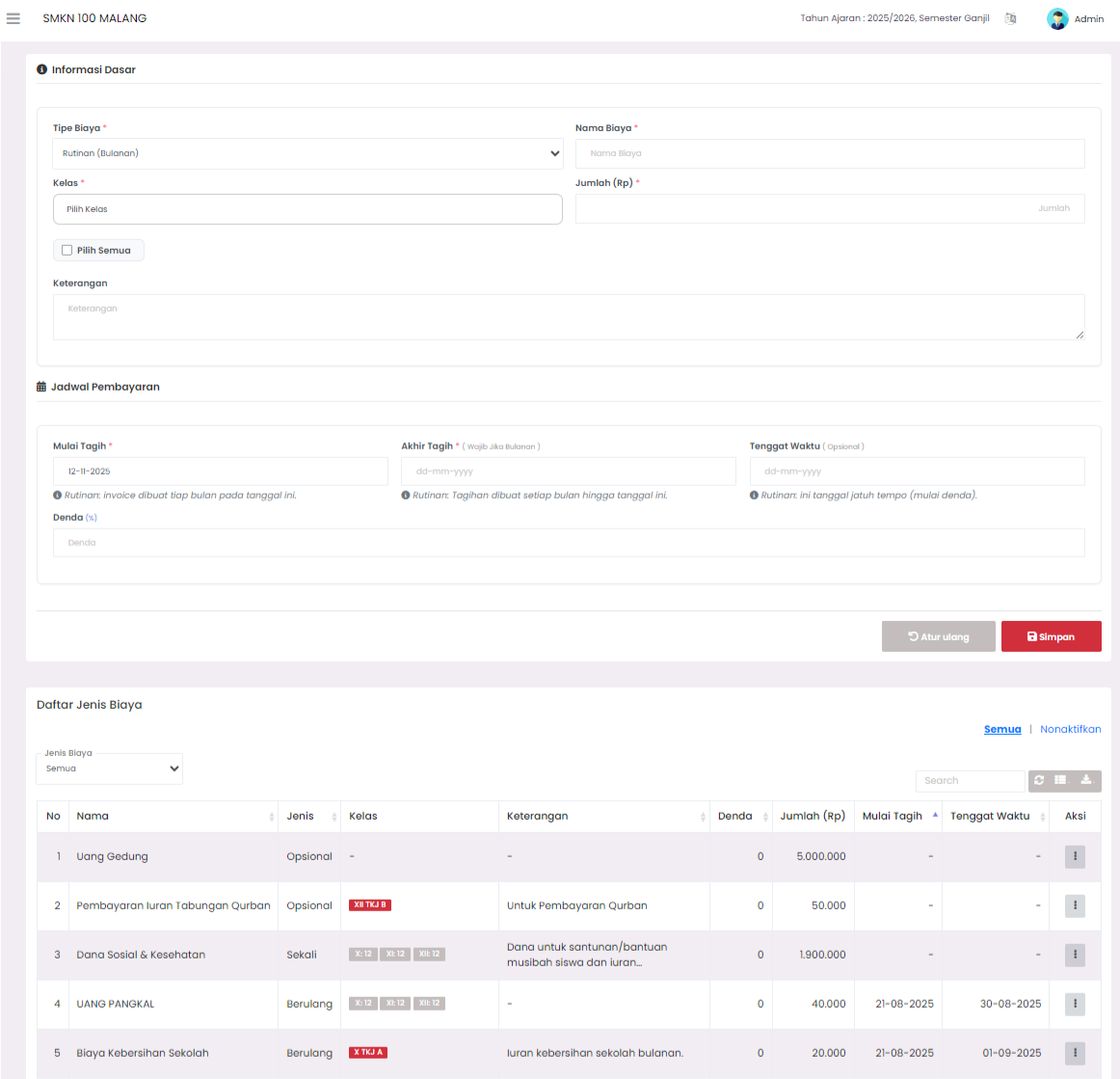
The Fee Types page is used to manage all types of fees applied in the school, such as routine fees, exams, construction, and other optional fees. Through this page, users can add, edit, deactivate, or delete fee data as needed.
1. Basic Information
The Basic Information section is used to add or change fee details.
Available fields include:
- Fee Type: Determines the type of fee, for example routine (monthly), one-time payment, or optional.
- Fee Name: Name of the fee to be billed, for example “School Cleanliness Contribution” or “Exam Fee”.
- Class: Determines which classes are charged the fee. Users can select one or several classes at once.
- Amount (Rp): Nominal fee that must be paid.
- Description: Additional description explaining the purpose or details of the fee.
2. Payment Schedule
The Payment Schedule section functions to determine the billing period and due date.
Available fields:
- Start Billing: Initial date of billing start.
- End Billing: Last date of billing for recurring fee types.
- Due Date: Payment due date.
- Fine (%): Percentage of fine that will be applied if payment passes the due date.
After all data is filled, click Save to save the new fee type or updates to existing data.
The Reset button can be used to clear all inputs and start filling from scratch.
3. Fee Type List
This section displays the entire list of fee types that have been created in a table format.
Available columns include:
- Type (One-time, Routine, Optional, etc.)
- Class
- Description
- Fine (%)
- Amount (Rp)
- Start Billing
- Due Date
- Action
The table can be filtered based on fee type and has a search feature to facilitate finding specific data.
4. Actions on Fee Data
Each row in the table has an Action button on the right side that functions to manage fee status:
- If the fee is active, users can choose to Edit or Deactivate.
- If the fee is inactive, the action button changes to Activate or Delete Permanently.
This feature makes it easy for users to manage the life cycle of fee data without having to delete important data directly.
5. Fee Detail
If a user clicks on one of the data rows in the table, a Fee Detail modal will appear displaying complete information about that fee type.
Information displayed includes:
- Fee Type and Fee Name
- Fee Amount
- Description
- Classes charged the fee
- Payment Schedule, including start billing date, end billing date, due date, and fine percentage.
Fitur ini membantu pengguna memeriksa detail biaya dengan cepat tanpa harus membuka halaman baru.
If you require further assistance, contact us through the eSchool Help page.