
Create Assignment
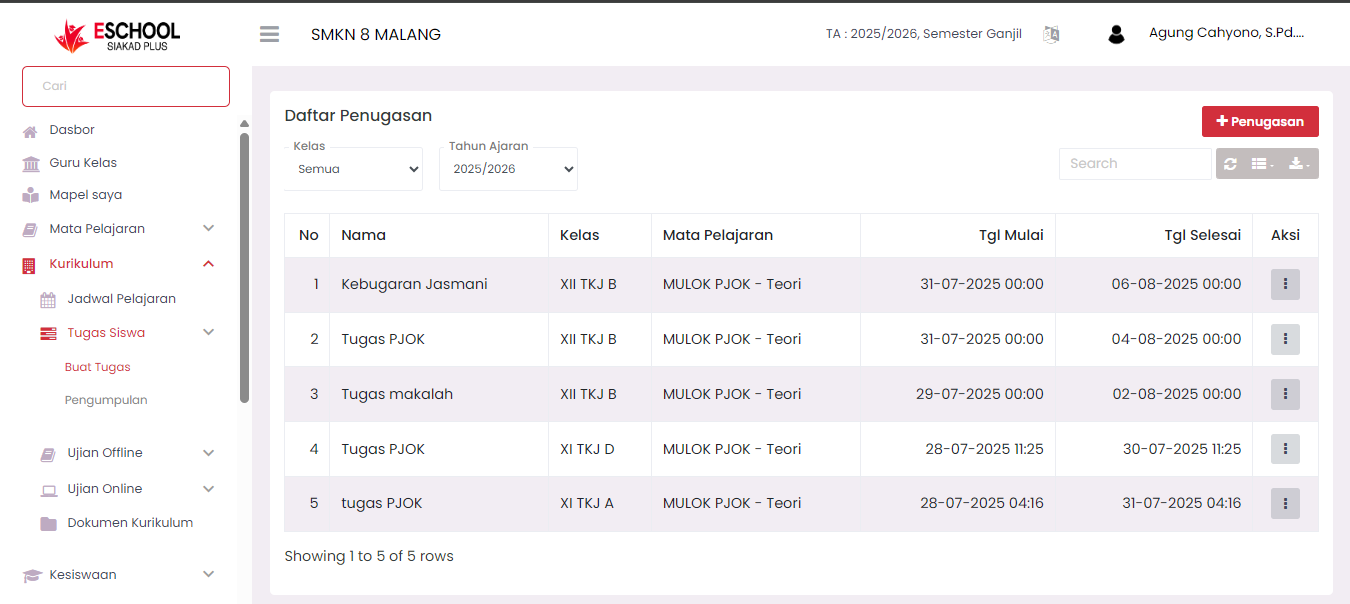
The Assignment List page in eSchool is where teachers can create, organize, and monitor all assignments given to students. This assignment process is integrated with the class system, academic calendar, and digital upload formats.
🎯 Purpose of This Page
- Provides a complete list of assignments created by teachers.
- Facilitates teachers in monitoring assignment deadlines.
- Efficiently manages assignment submissions and follow-ups.
🧭 Navigation and View
🔍 Search Filters
- Class: Filters assignments based on a specific class.
- Academic Year: Displays assignments according to the selected academic period.
- 🔎 Search Bar: Facilitates assignment search based on assignment name or other keywords.
📋 Information Displayed
| Column | Description |
|---|---|
| No | Assignment sequence number |
| Name | Assignment title or name |
| Class | Target class for assignment |
| Subject | Name of the subject related to the assignment, for example: MULOK PJOK – Theory |
| Start Date | Time when the assignment becomes accessible to students |
| End Date | Final deadline for assignment submission |
| Action | Action buttons to view, edit, or delete assignments |
➕ Adding a New Assignment
To create a new assignment:
- Click the red "+ Assignment" button at the top right.
- Fill in assignment details such as name, description, class, start and end dates, and attachment files if needed.
- Save the assignment to display it directly in the list.
🧠 Benefits of This Feature
| User | Real Benefit |
|---|---|
| Teachers | Monitor all created assignments and their active status in real-time |
| Homeroom Teachers | Supervise assignments across subjects to ensure curriculum achievement |
| Students | Get assignments clearly and scheduled, without risk of missing them |
✅ Usage Tips
- Provide a descriptive assignment name to make it easy to search for in the future.
- Monitor assignment deadlines to avoid student delays.
- Use the action button (three-dot icon) to edit or delete old assignments.
If you require further assistance, contact us through the eSchool Help page.