
Email Templates
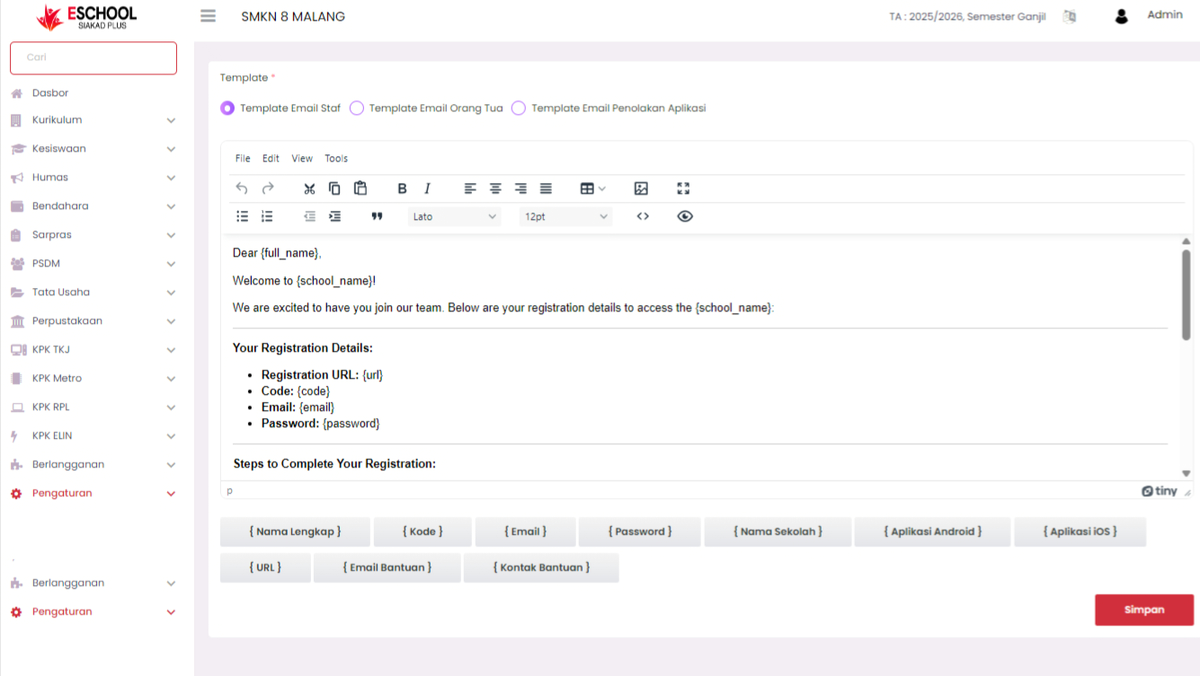
The Email Templates menu is used to create, modify, and manage email message formats that will be sent automatically by the system to relevant parties, such as staff, parents, or applicants whose applications are rejected. This feature ensures that official school communication has a uniform, professional format that meets their needs.
1. Email Template Types
At the top of the menu, there are several template type options that can be selected as needed:
- Staff Email Template – used to send registration information or notifications to school staff.
- Parent Email Template – used to send information related to the child or student to parents/guardians.
- Application Rejection Email Template – used to provide official notification regarding the rejection of a request or application.
Select one of the template types according to the delivery purpose.
2. Email Template Editor
The editor section allows users to write and format email content. Various text formatting features are available, such as bold, italic, lists, and font size settings.
In addition, the system provides variable placeholders that can be used to automatically display dynamic information in the email. These placeholders will be replaced by actual data when the email is sent.
List of Available Placeholders:
{Full Name}– automatically displays the recipient's name.{Code}– displays the registration or verification code.{Email}– displays the recipient's email address.{Password}– displays a temporary password.{School Name}– displays the name of the school sending the email.{URL}– displays the registration or login link.{Help Email}– displays the email address for assistance.{Help Contact}– displays the help center contact number.{Android App}– displays the Android app download link.{iOS App}– displays the iOS app download link.
To use a placeholder, simply click the corresponding button below the editor, and the code will automatically be inserted into the email text.
3. Saving Email Templates
After completing the creation or modification of the template content:
- Ensure the text has been checked and formatted well.
- Click the Save button at the bottom right to save the changes.
- The template will immediately be used by the system according to its type.
Benefits of the Email Template Feature
- Maintains consistency of official school email formats.
- Speeds up the communication process because templates can be used repeatedly.
- Reduces the risk of information input errors in emails.
- Enhances the professionalism of school communication with relevant parties.
If you require further assistance, contact us through the eSchool Help page.