
Payment Settings
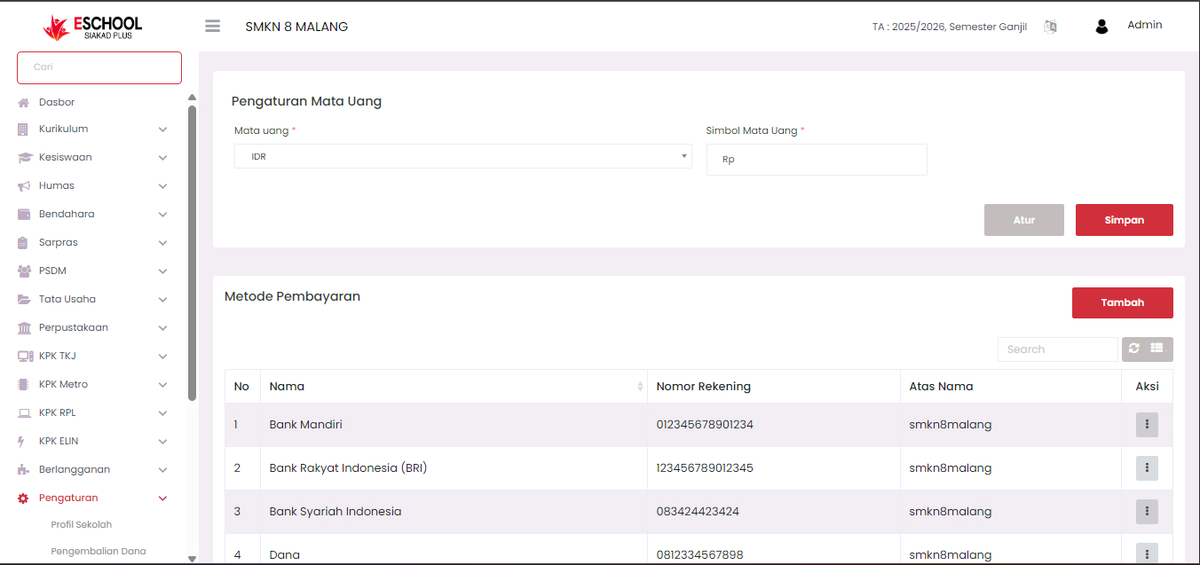
The Payment Settings menu is used to manage currency information and official payment methods accepted by the school. This feature ensures that all financial transactions are conducted in a structured, secure manner, and in accordance with institutional policies.
1. Currency Settings
This section serves to determine the type of currency and symbols used for all transactions within the system.
- Currency: Select the currency code (e.g., IDR for Indonesian Rupiah).
- Currency Symbol: Enter the symbol that will be displayed on transaction amounts (e.g., Rp).
- Click Save to apply the settings.
2. Payment Methods
This section is used to add, modify, or delete payment methods available at the school, either through bank accounts or digital wallets.
Information that can be configured includes:
- Name: The name of the bank or payment service provider (e.g., Bank Mandiri, BRI, Bank Syariah Indonesia, Dana, etc.).
- Account Number: A valid account number or payment account number.
- In the Name of: The name of the account holder or official school account.
- Image: The logo of the bank or provider (optional, for easier identification).
3. Adding a New Payment Method
- Click the Add button in the Payment Methods section.
- Fill in the Name, Account Number, In the Name of fields, and upload an image/logo if necessary.
- Click Save to save the new payment method.
4. Modifying or Deleting Payment Methods
- In the list of payment methods, click the three-dot icon in the Action column.
- Two options will appear:
- Edit: Opens the Edit Payment Method window (modal) to update data, including replacing the logo.
- Delete: Permanently removes the payment method from the list. Ensure this option is only used if the method is no longer in use.
Steps to Edit:
- Update information as needed.
- To replace the logo, click Upload to select a new image file or Remove Image to get rid of the existing logo.
- Click Save to save the changes.
Benefits of This Feature
- Simplifies centralized management of school account data.
- Avoids payment information errors for students or parents/guardians.
- Enhances transparency and accuracy in school financial transactions.
If you require further assistance, contact us through the eSchool Help page.