
Refunds
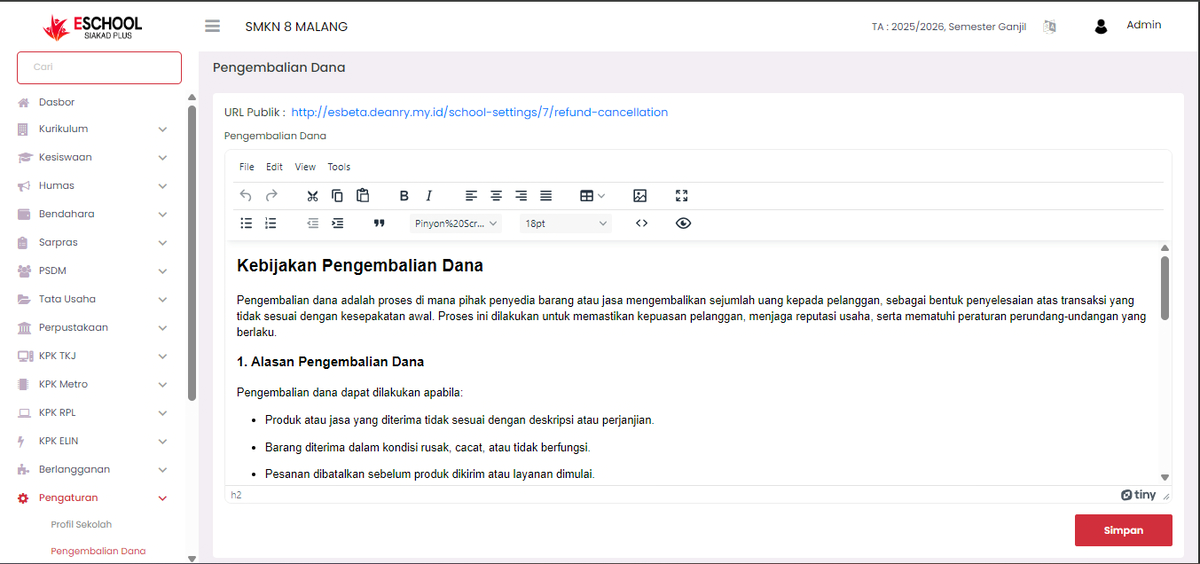
The Refunds menu serves to manage and display official school policies regarding the process of returning a sum of money to the entitled party, both students and parents/guardians, under certain conditions. This feature allows the school to convey information clearly, transparently, and in a documented manner so that all parties understand the applicable procedures.
Purpose of the Refunds Menu
- Provide written guidance on conditions that allow for refunds.
- Maintain the trust and reputation of the educational institution.
- Ensure procedures comply with applicable school regulations and policies.
Main Functions
- Display Refund Policy
Contains official descriptions regarding the definition, purpose, and conditions of refunds. - Explain Reasons for Refunds
Example conditions that can be reasons for a refund include:- Products or services received do not match the description or agreement.
- Items or facilities are received in a damaged, defective, or non-functional condition.
- Orders or services are canceled before the shipping or implementation process begins.
- Provide Public Access
The system provides a Public URL that can be shared with external parties, so that policy information can be accessed by parents/guardians or related parties without having to log in to the system.
Usage Instructions
- Access Menu
- Log in to the Admin account.
- Select the Settings menu on the sidebar.
- Click the Refunds sub-menu.
- Edit Policy
- Use the available text editor to add or update the policy content.
- Ensure the language used is clear, polite, and easy to understand.
- Save Changes
- After completing the edits, click the Save button to update the information.
- Share Public URL
- Copy the link listed in the Public URL section.
- Share it with parties who require the information.
If you require further assistance, contact us through the eSchool Help page.