
Attendance Dashboard
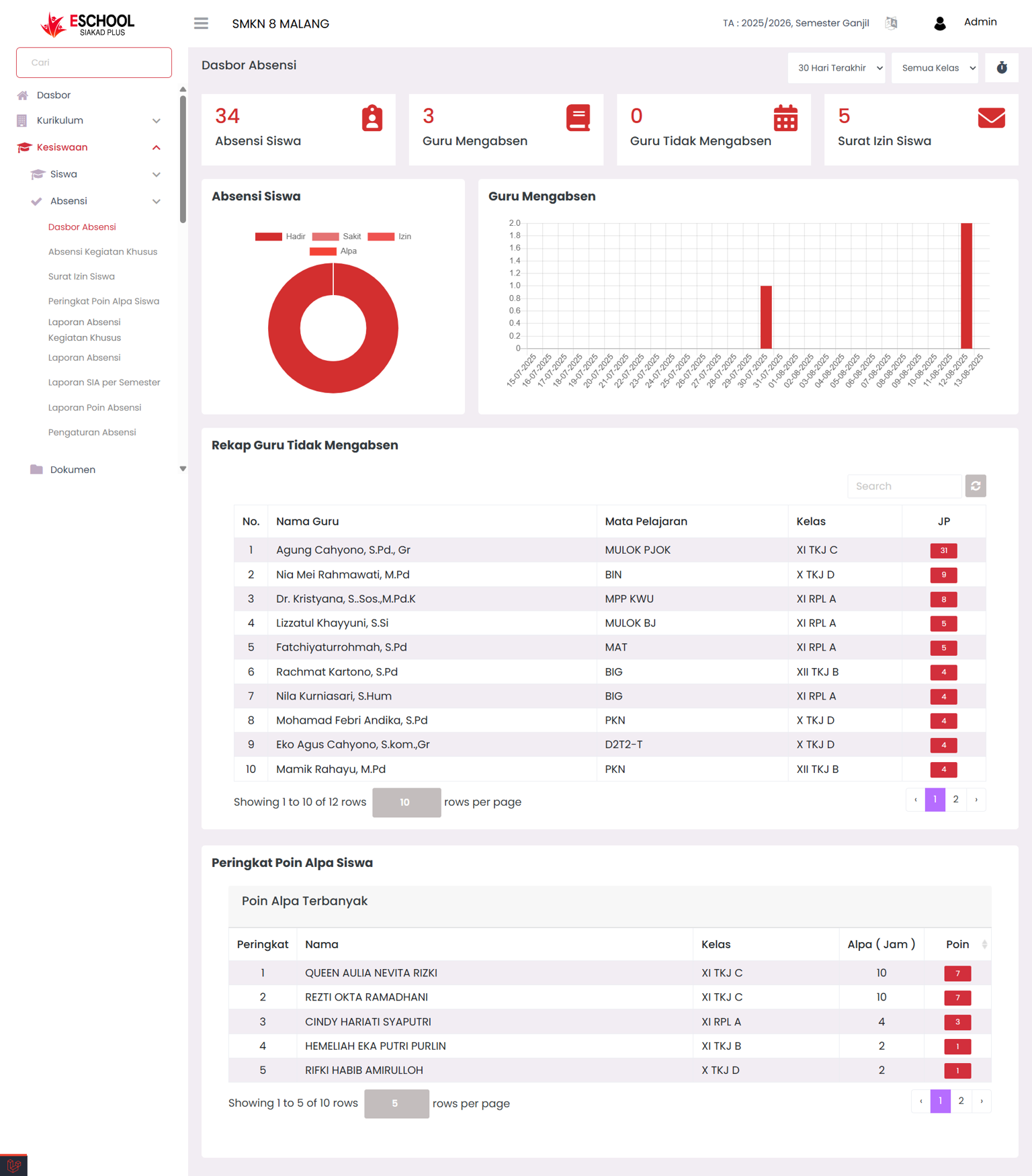
The Attendance Dashboard in eSchool is designed to provide a comprehensive overview of school attendance conditions in one integrated view. The displayed data includes the number of student absences, teachers recording attendance, teachers who haven't recorded attendance, and the number of student leave permits. This information is equipped with visual charts and recap tables so that monitoring can be done quickly, accurately, and in real-time.
When to Use This Feature?
- Monitor attendance conditions during study hours.
- Check teachers who are actively recording attendance and those who haven't.
- Identify students with the highest alpha points for coaching follow-up.
- Present a brief report for daily or weekly meetings.
Navigation and Filter
Users can narrow or broaden the displayed data with:
- Time Range Filter – Today, Last 7 Days, This Month, to Last Month.
- Class Filter – displays attendance data for specific classes or all classes at once.
- Auto Refresh – ⏱ icon that allows automatic data updates every 10 seconds without reloading the page.
Main Dashboard Components
- Statistics Cards – displays total:
- Student Attendance
- Teachers Recording Attendance
- Teachers Not Recording Attendance
- Student Leave Permits
- Visual Charts – donut chart for student attendance status distribution (Present, Sick, Permission, Alpha) and bar chart for teacher attendance activity per date.
- Recap Tables – consists of:
- Teachers Not Recording Attendance Recap – list of teachers, subjects, classes, and total lesson hours.
- Student Alpha Point Rankings – students with the most alpha hours along with their points.
Actions & Interaction
- Click the ⏱ icon to enable or disable 10-second auto-refresh.
- Change time and class filters to focus on specific data.
- Use the ranking table to determine priority students for coaching.
Benefits of This Feature
- Student Affairs → Monitor teacher and student compliance with attendance.
- Homeroom Teachers → Know students who need special coaching.
- School Leadership → View attendance trends for quick decision-making.
Usage Tips
- Enable auto-refresh when monitoring attendance during school entry/exit hours to quickly detect absences.
- Check the Teachers Not Recording Attendance Recap at the beginning of lesson hours and contact the relevant teachers if necessary.
- Use Alpha Point Rankings as material for weekly homeroom teacher or counseling (BK) meetings.
Need Further Help?
If you require further assistance, contact us through the eSchool Help page.