
Special Activity Attendance Report
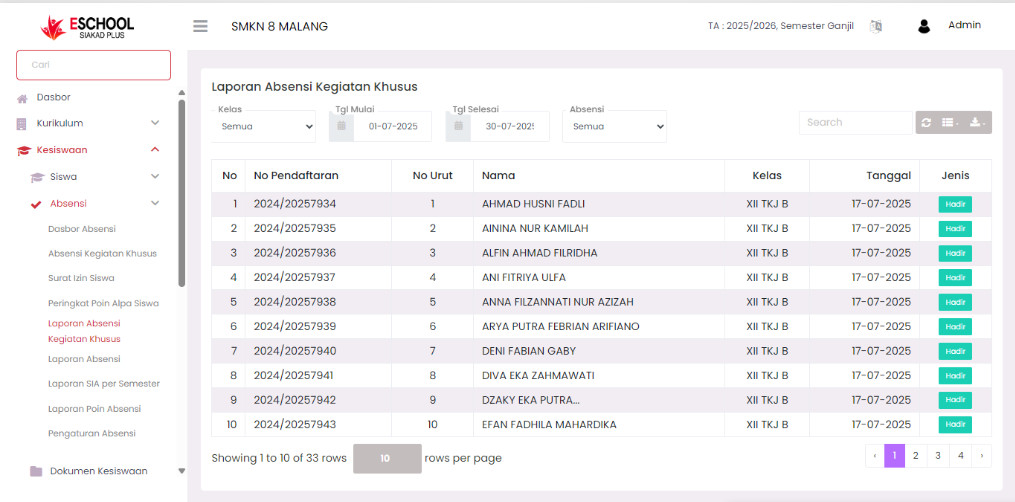
The Activity Attendance Report page in eSchool is designed to record and monitor student attendance in non-lesson activities. This feature separates special activity attendance from routine daily and per-subject attendance, so that reporting becomes more specific and orderly.
When to Use This Feature?
- When wanting to see the list of students present or absent in special events/activities.
- To create attendance reports separate from regular lesson attendance.
- As evaluation material for student participation in non-academic programs.
- To document student activeness in specific activities.
Navigation & Data Filter
Data Filter

Users can filter reports based on:
- Level → Select all levels or specific classes, example: (X, XI, XII, XIII).
- Class → Narrow data based on specific classes.
- Attendance Type → Filter data based on attendance status: Present, Not Present, Sick, Permission, or Alpha.
- Start Date & End Date → Determine the activity recording period.
This filter facilitates presency data search for the desired period and group.
Quick Search
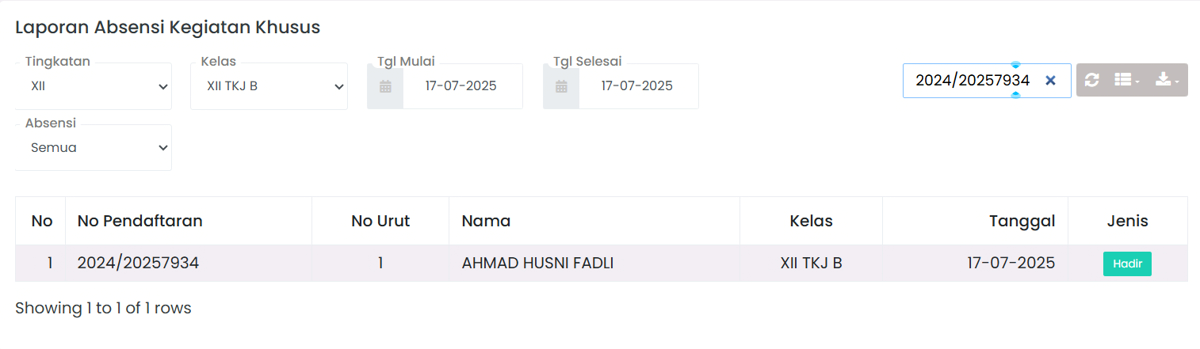
- Search Bar → Search for students by name or registration number.
Attendance Data Table
Each row in the table contains information:
| Column | Description |
|---|---|
| No | Data sequence number. |
| Registration No | Unique student ID. |
| Sequence No | Sequence number within class. |
| Name | Student's full name. |
| Class | Student's home class. |
| Date | Special activity date. |
| Type | Attendance status (Present, Sick, Permission, Alpha). |
Additional Features
- Search Bar → Facilitates quick data search.
- Export Data → Download reports in Excel (.xlsx) or PDF (.pdf) format.
- Pagination → Navigation between pages to view more than 10 entries per page.
Benefits of This Feature
| User | Specific Benefit |
|---|---|
| Activity Teachers | Recording active activity participants outside class accurately. |
| Homeroom Teachers | Knowing student activeness in non-academic programs. |
| Student Affairs | Creating discipline & student activeness reports across school activities. |
| Management | Getting student attendance insights in the context of institutional activities. |
Tips Usage
- Use the date filter to display reports according to the desired event.
- Download PDF reports for official school archives.
- Monitor students who are often absent for BK/student affairs intervention.
- Use the Attendance Type filter if you only want to focus on students who are absent or present.
Need Further Help?
If you require further assistance, contact us through the eSchool Help page.