
Semester SIA Report
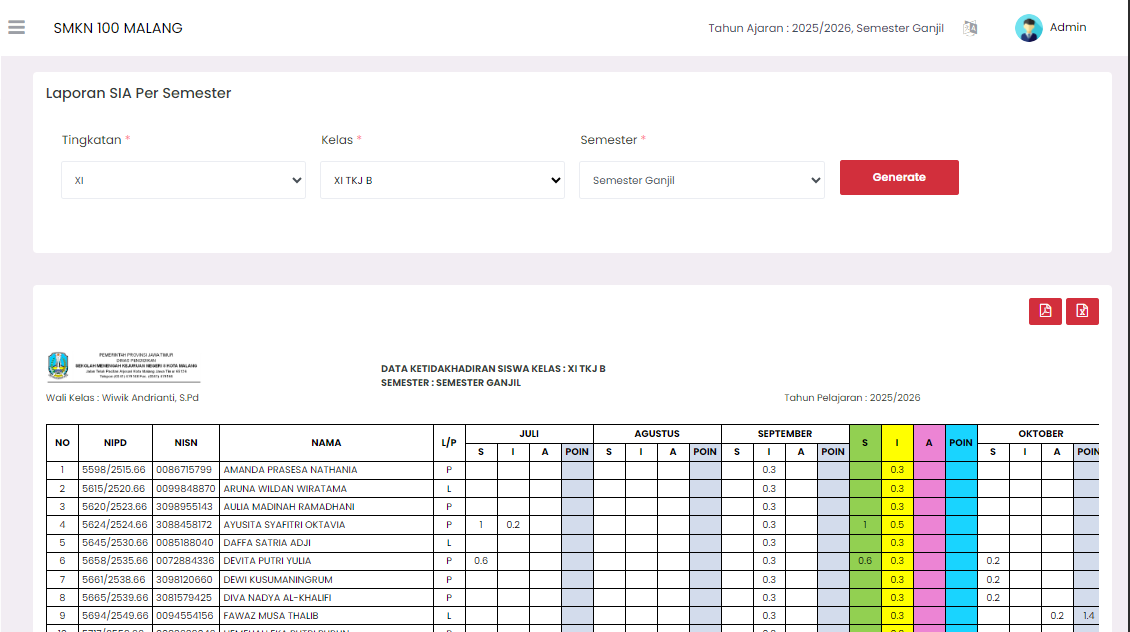
The Semester SIA Report page provides a detailed summary of student absence data per month in one full semester. This report is informative and only functions for reviewing and printing data.
Report Filter
To display the desired report, you must specify the following filters:
- Level: Select the student class level (for example, X, XI, or XII).
- Class: Select the specific class you want to review.
- Semester: Select the semester to be reported (for example, Odd or Even).
After selecting all criteria, click the red Generate button to load the attendance report per semester.
Student Absence Data Table
This report displays the accumulation of student absence data per month in one semester.
| Main Column | Description |
|---|---|
| No, NIS/NISN, Name | Student identity data. |
| Month (July - December, etc.) | Each month in the semester will have its own column. |
| TOTAL | Accumulated total absence and sanction points during one semester. |
Per Month Column Details
Under each month name (for example, July, August), there are sub-columns detailing the type of absence:
- S (Sick): Total absences in units of days due to illness.
- I (Permission): Total absences in units of days due to permission.
- A (Alpha/No Explanation): Total absences in units of days without explanation.
- POINT: Accumulated total sanction points obtained by the student in that month.
Report Usage
This report is Read-Only. You cannot make changes, edits, or enter attendance data directly from this page. This page only functions as a final semester recapitulation view.
You can use the action buttons on the top right of the report to:
- Print: Print the report in physical format.
- Download: Download the report into a file (for example, PDF or Excel) for archive purposes.
Need Further Help?
If you require further assistance, contact us through the eSchool Help page.