
Import Data
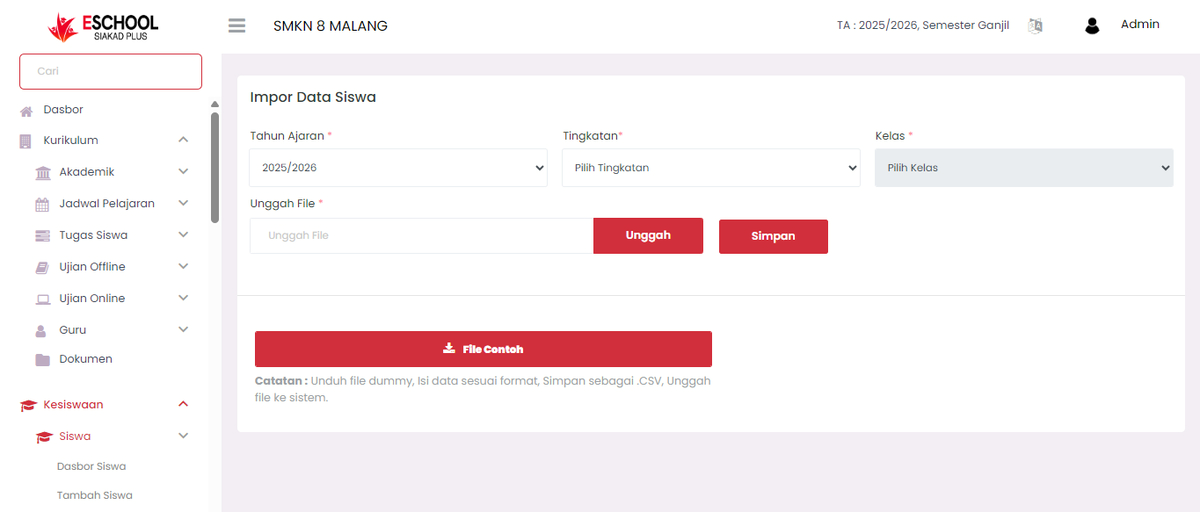
The Student Data Import feature is designed to facilitate the mass entry of student data into the eSchool SIAKAD Plus system. With this feature, admins don't need to input one by one through manual forms, just use a specifically formatted CSV file.
How to Access
- Open Student Affairs > Student > Import Data.
- Click the Sample File button to download the CSV template.
- Fill in the file according to the provided format.
- Upload the file using the Upload button.
- Click Save to process the data into the system.
Required CSV File Format
[!IMPORTANT] Only files with the
.csv(Comma Separated Values) extension can be used for the import process.
The uploaded file must meet the determined structure, cannot be in Excel (.xlsx), .ods, or other formats.
CSV Format Structure
The following are the column structures that must be present in the .csv file:
| Column | Description |
|---|---|
first_name | Student's first name. |
last_name | Student's last name (can be left blank if none). |
mobile | Student's active mobile number. |
gender | Gender, can only contain male or female. |
dob | Date of birth in dd-mm-yyyy format. |
admission_date | Admission date, format: dd-mm-yyyy. |
current_address | Current residential address. |
permanent_address | Permanent domicile address (can be the same as current address). |
guardian_email | Guardian email (must be unique and valid). |
guardian_first_name | Guardian's first name. |
guardian_gender | Guardian gender (male or female). |
guardian_mobile | Guardian's mobile number. |
Tips for Successful Import
- Ensure all columns are filled according to the format.
- Do not change column names in the CSV file.
- Use a spreadsheet application like Microsoft Excel, Google Sheets, or LibreOffice to edit the CSV file.
- Re-save the file as
.csv (Comma delimited)before uploading.
Common Errors to Avoid
| Error | Impact |
|---|---|
File is not .csv | System will reject the upload. |
| Incomplete or wrong column names | Data will not be read. |
| Date format does not match | Failed to process or error. |
| Gender filled other than "male/female" | Rejected by the system. |
| Duplicate email | System will not save the data. |
Need Further Help?
If you require further assistance, contact us through the eSchool Help page.