
Sequence Numbers
Arrange Student Sequence Numbers by Class and Grade Level
The Sequence Numbers page in eSchool SIAKAD Plus is used to manage and edit student order within classes. This feature makes it easy for admins or homeroom teachers to arrange student attendance numbers according to school administrative needs, especially for attendance, exams, or other reports.
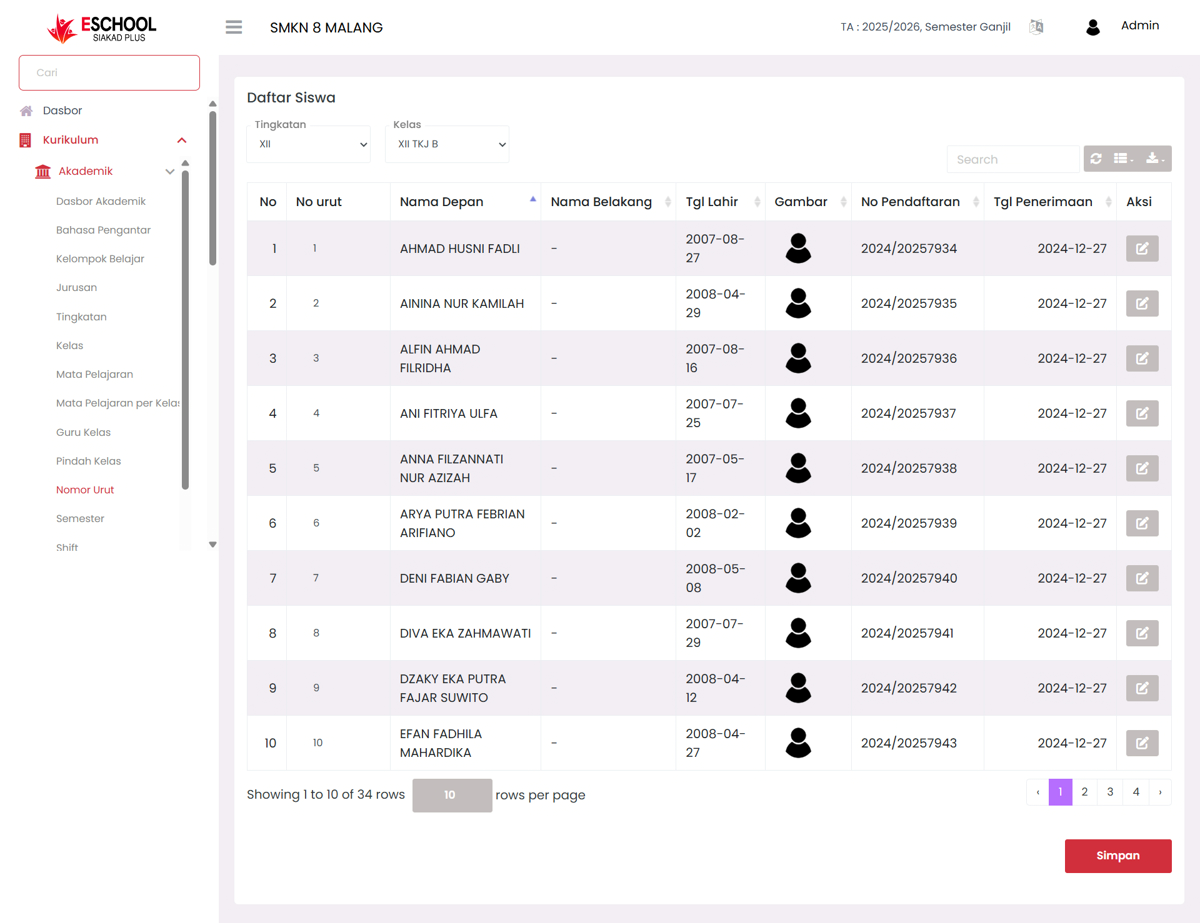
Main Functions
- Display student lists based on grade level and class.
- Edit sequence numbers directly from the table quickly and efficiently.
- Support quick student search based on name or other data.
- Export sequence number data to files with download options.
When is This Feature Used?
- When making changes to student order (e.g., due to transfers or regrouping).
- When compiling attendance or presence lists.
- To adjust name order in official class documents.
- When managing new classes at the beginning of each academic year.
Available Components
- Grade Level & Class Dropdown: To select student data by class.
- Interactive "Sequence No" Column: Can be edited by pressing the pencil icon in the status column.
- Dynamic Table: Displays student names, birth dates, registration numbers, and images.
- Edit Action: To change student sequence numbers.
- Search & Export: Search for specific students and export data as needed.
Need Further Assistance?
If you require additional support, please reach out to us via the eSchool Help Page.