
Dashboard
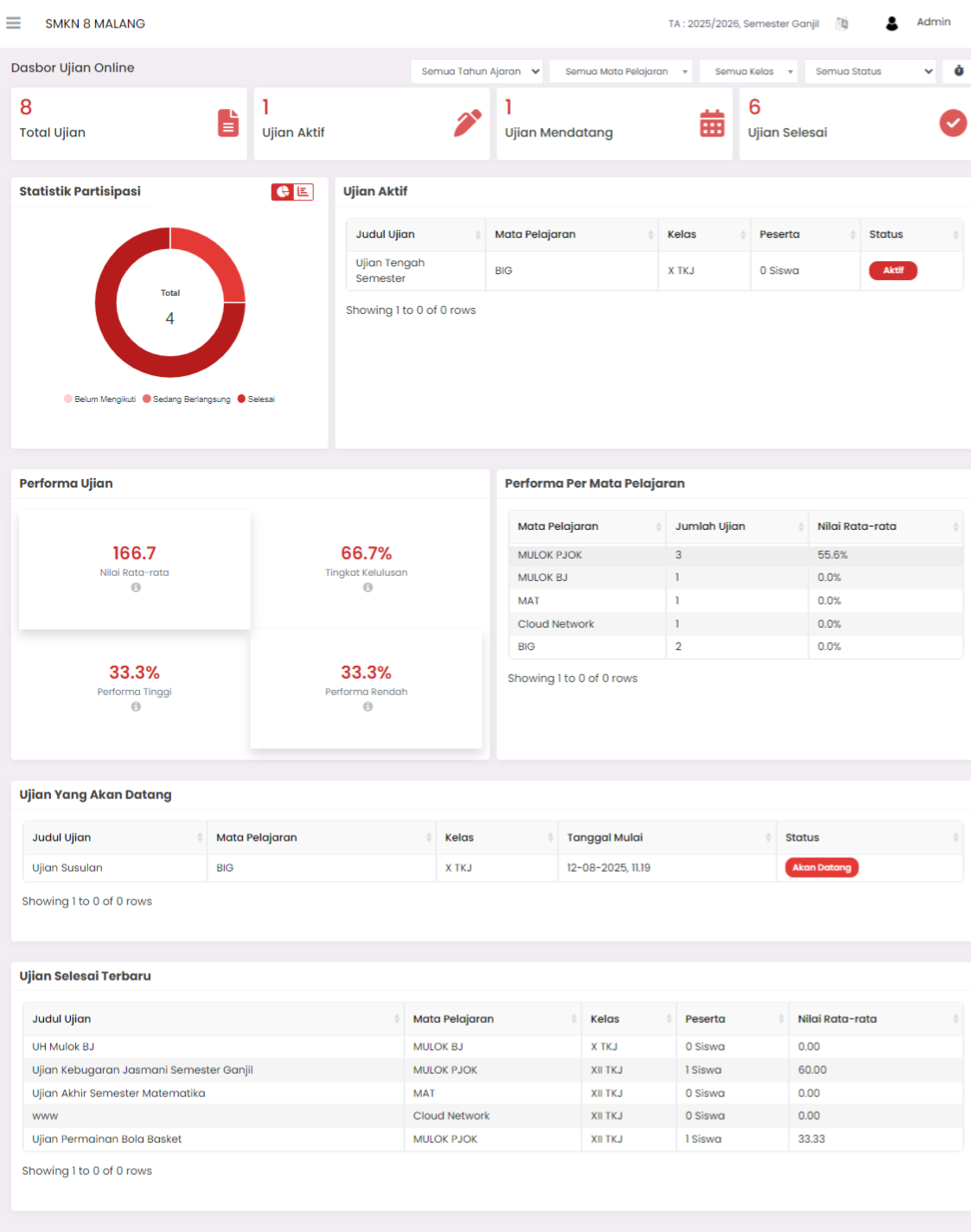
The Online Exam Dashboard is the main display that presents statistical summaries and real-time monitoring of online exam implementation. This page serves as a control center for Admin/Teachers to monitor exam status, student performance, and overall exam activities.
Online Exam Dashboard Components
Total Exams
Displays the total number of online exams registered in the system.
Active Exams
Shows the number of exams currently in progress (live).
Upcoming Exams
Number of exams that have been scheduled but not yet started.
Completed Exams
Number of exams that have been completed.
Participation Statistics
Displays a donut chart illustrating student participation status across all exams:
- Not Yet Participated
- In Progress
- Completed
This visualization helps monitor student progress on available exams.
Active Exam List
This section displays details of exams currently in progress, with the following information:
- Exam Title
- Subject
- Class
- Number of Active Participants
- Status (Active/Completed)
Overall Exam Performance
Here are displayed performance metrics of students in taking online exams:
- Average Score → Average score across all exams.
- Pass Rate → Percentage of students who achieved passing grades.
- High Performance → Percentage of students with high scores.
- Low Performance → Percentage of students with low scores.
Performance Per Subject
Details exam performance statistics per subject:
- Subject Name
- Number of exams conducted.
- Average score for that subject.
This feature facilitates specific performance analysis per field of study.
Upcoming Exams
Displays a list of scheduled exams that have not yet started:
- Exam Title
- Subject
- Class
- Start Date
- Status (Upcoming)
Recently Completed Exams
This section shows a list of recently completed exams, with details:
- Exam Title
- Subject
- Class
- Number of Participants
- Average Score
This feature is useful for monitoring the latest exam results that have been completed.
Main Functions of Online Exam Dashboard:
- Monitor exam status (active, upcoming, completed).
- Track student participation statistics in real-time.
- View exam performance trends globally and per subject.
- Quickly access upcoming exam lists and completed exam results.
Need Further Assistance?
If you require additional support, please reach out to us via the eSchool Help Page.