
Exams
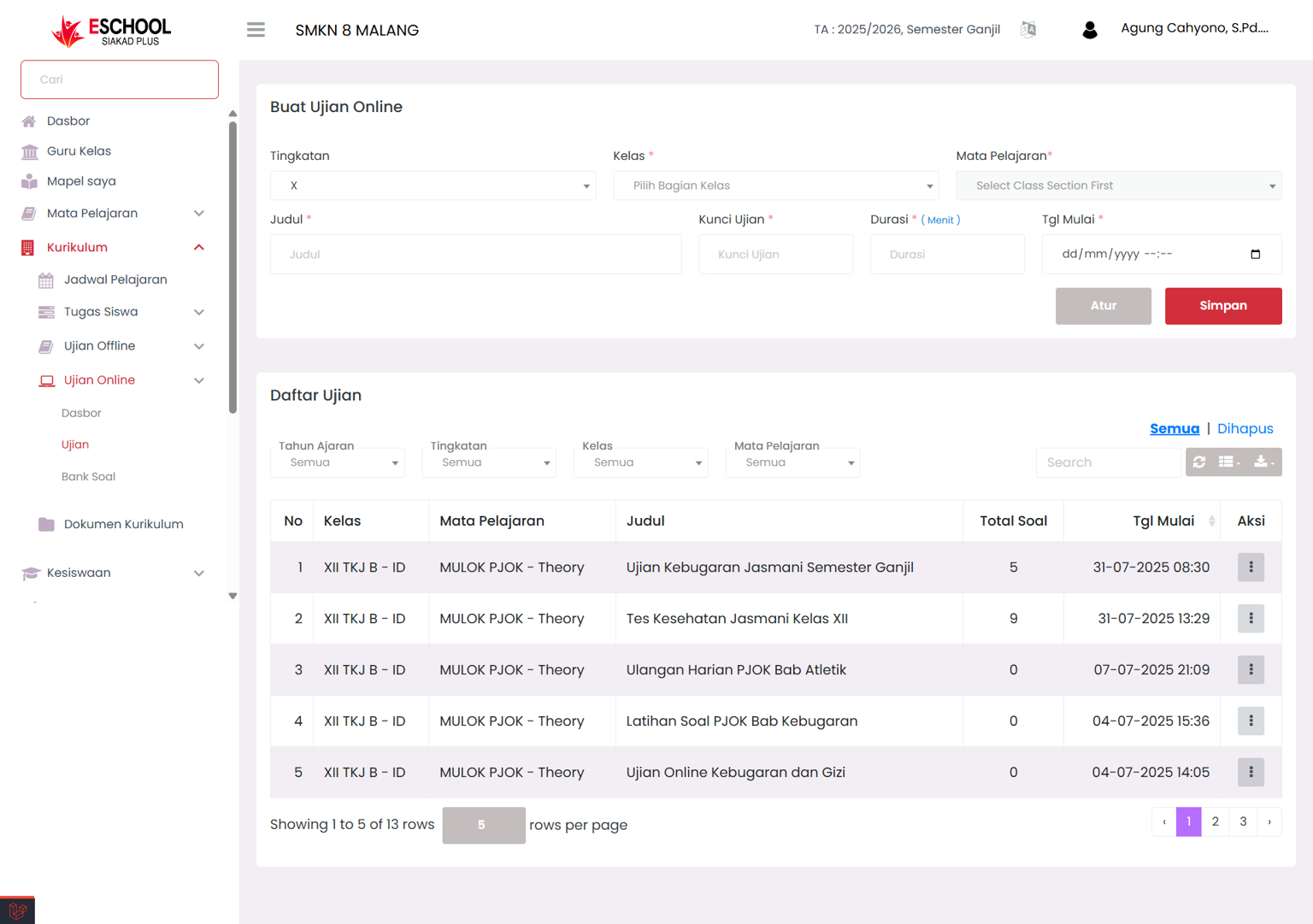
Create and Manage Online Exams Practically and Structured
The Online Exams page serves as a control center for teachers to create, schedule, and monitor online-based exams for students at every grade level and subject. This feature is designed to facilitate the learning evaluation process quickly, measurably, and digitally documented.
🛠️ Online Exam Form Filling Guide
Grade Level (Required)
Select the grade level such as X, XI, XII.
Class (Required)
Select a specific class, example: XII TKJ B.
Subject (Required)
Select the subject, example: MULOK PJOK - Theory.
Exam Title (Required)
Enter the exam name, such as: Final Exam Odd Semester - PJOK.
Exam Key (Required)
Enter an access code so that only certain students can open the exam.
Duration (Required)
Fill in the working duration in minutes, example: 60.
Start Date and Time (Required)
Determine when the exam will start.
Active Exam List
Displays all exams that have been created in table form with information:
- No
- Class
- Subject
- Title
- Total Questions
- Start Date
- Action (Edit / Delete / View Details)
✅ Click the Save button to publish the exam. Click Close if you want to cancel without saving.
🔍 Filter & Search
This page supports filtering based on:
- Academic year
- Grade level
- Specific class
- Subject
The search box feature in the upper right corner is very useful for finding specific exams quickly.
🛠️ Common Issues That May Occur
Subject does not appear
Make sure the class has been selected first
Exam cannot be saved
Check again whether all fields (title, key, duration, date) have been filled
Questions do not appear in list
Make sure questions have been added to the question bank, or check synchronization
💡 Additional Tips
- Use clear and consistent exam titles for easy recognition.
- Set the implementation time according to the learning schedule to avoid conflicts.
- Keep the exam key safe to maintain access security.
- After creating an exam, make sure students know the schedule and instructions clearly.
- Avoid editing exams while they are running, unless absolutely necessary.
Need Further Assistance?
If you require additional support, please reach out to us via the eSchool Help Page.